# fancyqr
[](https://www.latex-project.org/) [](http://makeapullrequest.com) [](https://www.ctan.org/pkg/fancyqr) [](https://github.com/EagleoutIce/fancyqr/actions/workflows/compile.yaml)
[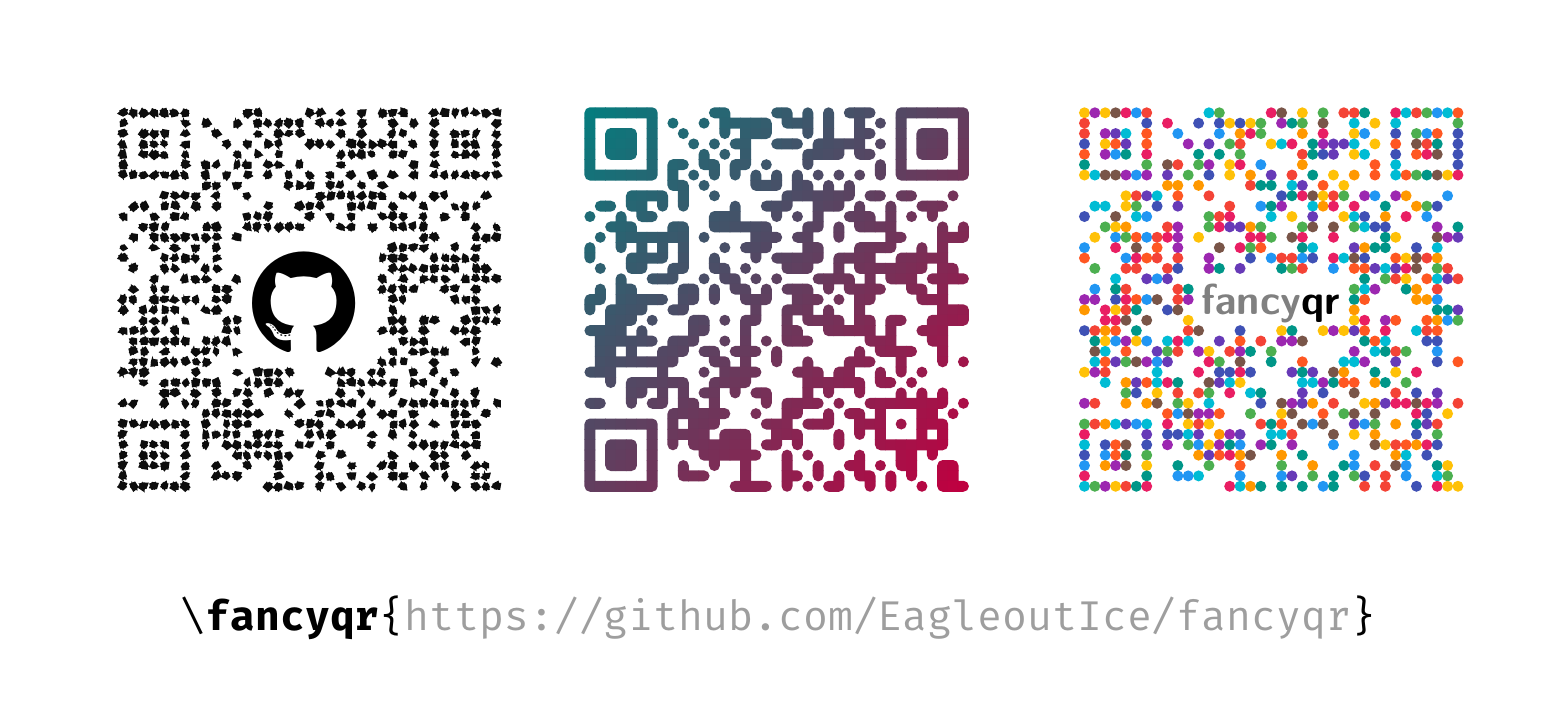 ](qr-example.tex)
A simple package to create fancy qr-codes with the help of the [`qrcode`][qrcode]-package.
You may use `\fancyqr` just like the normal `\qrcode` (`\fancyqr[]{}`). See the [documentation](https://github.com/EagleoutIce/fancyqr/raw/gh-pages/fancyqr-doc.pdf). If you just want to create a simple qr-code, please refer to the [minimal example](qr-minimal.tex). The package also ships an `l3build` test suite in `tests/`, which you can run with `l3build check`.
*fancyqr* is actively developed by *Florian Sihler* (contact me at: ) under the [LPPL Version 1.3c](LICENSE) (please note that this changed on 2026-02-27 from GPL v3, versions **after** v2.2 are licensed with LPPL 1.3c). I am very happy about every contribution (see [CONTRIBUTING.md](CONTRIBUTING.md)). You can find it on CTAN ().
If you do want to hide a center square (e.g., because you want to embed an image), you can use `\FancyQrDoNotPrintSquare{}{}` to hide a rectangle with radius x and y set from the center (with `\FancyQrDoNotPrintRadius{}` you can apply a [rounding](https://github.com/EagleoutIce/fancyqr/pull/41) to this!). If you choose this option, the default `\FancyQrRoundCut` that rounds cut corners can be changed with `\FancyQrHardCut`. The random seed used by the randomized styles can be fixed with `\FancyQrSeed{}` (same effect as the `seed` option), a style asks for extra drawing passes with `\FancyQrPasses{}` (this is how `glows` layers its halo below every tile, which `\FancyQrGlow{}{}{}` and `\FancyQrGlowColor{}{}` tune), and it declares whether its tiles understand inner corners with `\FancyQrInnerRoundings` or `\FancyQrNoInnerRoundings` (`default` and `glows` do, `rounded`, `flat`, `dots`, `frame` and the randomized styles do not).
At the moment, there are eight other styles (`rounded`, `flat`, `frame`, `blobs`, `glitch`, `dots`, `glows`, and `goo`) that you can load (locally) by using `\FancyQrLoad{}`; `rounded` is the `default` shape with hard inner corners (the pre-v2.4 look), `frame` outlines the shape the modules form and puts a dot in every module, `glitch` tears its shards apart into displaced ghosts and randomly detaches some of them, `glows` puts every tile into a soft halo, and `goo` distorts the tiles into merging, water-like blobs (it is randomized, so use the `seed` option for reproducible output). Every style but `frame` is read by a scanner as it is (`frame` needs `finder=square` for that). The default style is named `default` and can be 'reset' by `\FancyQrLoad{default}` or `\FancyQrLoadDefault`.
There are the following extra qr-options (you can set all of them with `\fancyqrset{}`):
| Option | Type | Default | Explanation |
| ------------------ | ----------------------------------------- | :------------: | ------------------------------------------------------------------------------------------------------------------------------------------------------------------------------------------------ |
| `cache` | boolean | `true` | Keep the module matrix of a code, so drawing it again only has to redraw it. |
| `classic` | boolean | `false` | Use the classic qr-code style (black with flat rectangles, this loads the `flat` style). |
| `color` | color | | Disables the `gradient` and sets the qr color accordingly. |
| `compensate` | length | | Overlap between neighbouring tiles as an absolute length; setting it switches off the module-relative `overlap`. |
| `content color` | color | | Color of everything that is not a position or alignment pattern, so the patterns can keep the gradient while the data stays flat. |
| `finder` | `inherit`/`square`/`rounded`/`circle` | `inherit` | Draws the patterns as one shape (`square`, `rounded`, `circle`) instead of as single modules; `inherit` (synonym `none`) leaves them to the tiles of the style. |
| `finder color` | color | | Color used for the position (finder) and alignment patterns; without `finder` they keep their normal tiles and are only recolored. |
| `finder core` | `auto`/`square`/`rounded`/`circle`/`star` | `auto` | Shape of the center block of every position and alignment pattern; `auto` follows `finder` and only applies together with it. |
| `finder radius` | number | `0.5` | Corner radius of the `rounded` pattern shape, relative to the pattern radius. |
| `finder thickness` | number | `1` | Width of the pattern ring, in modules. |
| `gradient angle` | angle | `135` | Change the gradient angle, in degrees; `0` runs from left to right. |
| `gradient` | boolean | true | Toggle the color gradient |
| `image` | LaTeX | | Automatically center an image (you have to care for the size and maybe adjust the `version` and `level` to keep the qr-code readable).[^1] |
| `image padding` | number | | Additionally hide blocks (x & y) around the image. |
| `image x padding` | number | `0` | Additionally hide blocks (x) around the image. |
| `image y padding` | number | `0` | Additionally hide blocks (y) around the image. |
| `inner rounding` | number | `0.25` | Radius of the negative ('inner') fillet applied to concave corners (two black neighbours, but not the diagonal one); `0` disables it. |
| `l color` | color | *see below* | Color at the left end of the gradient axis, which the default angle puts at the bottom right. |
| `left color` | color | | Alias for `l color`. |
| `level` | L/M/Q/H | `M` | [`qrcode`][qrcode] option affecting error correction (low, medium, quartile, high). |
| `overlap` | number | `0.045` | Overlap between neighbouring tiles, as a fraction of a module: two tile edges crossing the same pixel each cover only part of it, so the renderer leaves a sliver of background showing through. |
| `padding` | flag | | [`qrcode`][qrcode] option adding sufficient additional space around the qr-code. |
| `r color` | color | *see below* | Color at the right end of the gradient axis, which the default angle puts at the top left. |
| `random color` | colors | | Allow to set a random color pool to pick from. |
| `right color` | color | | Alias for `r color`. |
| `rounding` | number | `0.5` | Corner radius of the rounded tiles of the `default` style. |
| `seed` | integer | | Fixes the random seed, so the randomized styles (`blobs`, `glitch`, `goo`) render reproducibly. |
| `size` | length | | Alias for [`qrcode`'s][qrcode] `height` option. |
| `tight` | flag | | [`qrcode`][qrcode] option adding no additional space around the qr-code. |
| `version` | [0..40] ∈ ℕ | `0` | [`qrcode`][qrcode] option affecting the size (tries to be as small as possible). |
| `width` | length | | Alias for [`qrcode`'s][qrcode] `height` option. |
The defaults are set like this:
```LateX
\fancyqrset{image padding=0,gradient=true,gradient angle=135,r color=red!68!black!88!white!90!white,
l color=purple!40!red!20!black!90!white}
```
[^1]: The package will automatically calculate the required `\FancyQrDoNotPrintSquare` (you have to ensure that the qr-code still has enough information to be readable). Therefore, the image will not scale with the qr-code.
[qrcode]: https://www.ctan.org/pkg/qrcode
](qr-example.tex)
A simple package to create fancy qr-codes with the help of the [`qrcode`][qrcode]-package.
You may use `\fancyqr` just like the normal `\qrcode` (`\fancyqr[]{}`). See the [documentation](https://github.com/EagleoutIce/fancyqr/raw/gh-pages/fancyqr-doc.pdf). If you just want to create a simple qr-code, please refer to the [minimal example](qr-minimal.tex). The package also ships an `l3build` test suite in `tests/`, which you can run with `l3build check`.
*fancyqr* is actively developed by *Florian Sihler* (contact me at: ) under the [LPPL Version 1.3c](LICENSE) (please note that this changed on 2026-02-27 from GPL v3, versions **after** v2.2 are licensed with LPPL 1.3c). I am very happy about every contribution (see [CONTRIBUTING.md](CONTRIBUTING.md)). You can find it on CTAN ().
If you do want to hide a center square (e.g., because you want to embed an image), you can use `\FancyQrDoNotPrintSquare{}{}` to hide a rectangle with radius x and y set from the center (with `\FancyQrDoNotPrintRadius{}` you can apply a [rounding](https://github.com/EagleoutIce/fancyqr/pull/41) to this!). If you choose this option, the default `\FancyQrRoundCut` that rounds cut corners can be changed with `\FancyQrHardCut`. The random seed used by the randomized styles can be fixed with `\FancyQrSeed{}` (same effect as the `seed` option), a style asks for extra drawing passes with `\FancyQrPasses{}` (this is how `glows` layers its halo below every tile, which `\FancyQrGlow{}{}{}` and `\FancyQrGlowColor{}{}` tune), and it declares whether its tiles understand inner corners with `\FancyQrInnerRoundings` or `\FancyQrNoInnerRoundings` (`default` and `glows` do, `rounded`, `flat`, `dots`, `frame` and the randomized styles do not).
At the moment, there are eight other styles (`rounded`, `flat`, `frame`, `blobs`, `glitch`, `dots`, `glows`, and `goo`) that you can load (locally) by using `\FancyQrLoad{}`; `rounded` is the `default` shape with hard inner corners (the pre-v2.4 look), `frame` outlines the shape the modules form and puts a dot in every module, `glitch` tears its shards apart into displaced ghosts and randomly detaches some of them, `glows` puts every tile into a soft halo, and `goo` distorts the tiles into merging, water-like blobs (it is randomized, so use the `seed` option for reproducible output). Every style but `frame` is read by a scanner as it is (`frame` needs `finder=square` for that). The default style is named `default` and can be 'reset' by `\FancyQrLoad{default}` or `\FancyQrLoadDefault`.
There are the following extra qr-options (you can set all of them with `\fancyqrset{}`):
| Option | Type | Default | Explanation |
| ------------------ | ----------------------------------------- | :------------: | ------------------------------------------------------------------------------------------------------------------------------------------------------------------------------------------------ |
| `cache` | boolean | `true` | Keep the module matrix of a code, so drawing it again only has to redraw it. |
| `classic` | boolean | `false` | Use the classic qr-code style (black with flat rectangles, this loads the `flat` style). |
| `color` | color | | Disables the `gradient` and sets the qr color accordingly. |
| `compensate` | length | | Overlap between neighbouring tiles as an absolute length; setting it switches off the module-relative `overlap`. |
| `content color` | color | | Color of everything that is not a position or alignment pattern, so the patterns can keep the gradient while the data stays flat. |
| `finder` | `inherit`/`square`/`rounded`/`circle` | `inherit` | Draws the patterns as one shape (`square`, `rounded`, `circle`) instead of as single modules; `inherit` (synonym `none`) leaves them to the tiles of the style. |
| `finder color` | color | | Color used for the position (finder) and alignment patterns; without `finder` they keep their normal tiles and are only recolored. |
| `finder core` | `auto`/`square`/`rounded`/`circle`/`star` | `auto` | Shape of the center block of every position and alignment pattern; `auto` follows `finder` and only applies together with it. |
| `finder radius` | number | `0.5` | Corner radius of the `rounded` pattern shape, relative to the pattern radius. |
| `finder thickness` | number | `1` | Width of the pattern ring, in modules. |
| `gradient angle` | angle | `135` | Change the gradient angle, in degrees; `0` runs from left to right. |
| `gradient` | boolean | true | Toggle the color gradient |
| `image` | LaTeX | | Automatically center an image (you have to care for the size and maybe adjust the `version` and `level` to keep the qr-code readable).[^1] |
| `image padding` | number | | Additionally hide blocks (x & y) around the image. |
| `image x padding` | number | `0` | Additionally hide blocks (x) around the image. |
| `image y padding` | number | `0` | Additionally hide blocks (y) around the image. |
| `inner rounding` | number | `0.25` | Radius of the negative ('inner') fillet applied to concave corners (two black neighbours, but not the diagonal one); `0` disables it. |
| `l color` | color | *see below* | Color at the left end of the gradient axis, which the default angle puts at the bottom right. |
| `left color` | color | | Alias for `l color`. |
| `level` | L/M/Q/H | `M` | [`qrcode`][qrcode] option affecting error correction (low, medium, quartile, high). |
| `overlap` | number | `0.045` | Overlap between neighbouring tiles, as a fraction of a module: two tile edges crossing the same pixel each cover only part of it, so the renderer leaves a sliver of background showing through. |
| `padding` | flag | | [`qrcode`][qrcode] option adding sufficient additional space around the qr-code. |
| `r color` | color | *see below* | Color at the right end of the gradient axis, which the default angle puts at the top left. |
| `random color` | colors | | Allow to set a random color pool to pick from. |
| `right color` | color | | Alias for `r color`. |
| `rounding` | number | `0.5` | Corner radius of the rounded tiles of the `default` style. |
| `seed` | integer | | Fixes the random seed, so the randomized styles (`blobs`, `glitch`, `goo`) render reproducibly. |
| `size` | length | | Alias for [`qrcode`'s][qrcode] `height` option. |
| `tight` | flag | | [`qrcode`][qrcode] option adding no additional space around the qr-code. |
| `version` | [0..40] ∈ ℕ | `0` | [`qrcode`][qrcode] option affecting the size (tries to be as small as possible). |
| `width` | length | | Alias for [`qrcode`'s][qrcode] `height` option. |
The defaults are set like this:
```LateX
\fancyqrset{image padding=0,gradient=true,gradient angle=135,r color=red!68!black!88!white!90!white,
l color=purple!40!red!20!black!90!white}
```
[^1]: The package will automatically calculate the required `\FancyQrDoNotPrintSquare` (you have to ensure that the qr-code still has enough information to be readable). Therefore, the image will not scale with the qr-code.
[qrcode]: https://www.ctan.org/pkg/qrcode